
PDF (Portable Document Format)
A fixed-layout format that looks the same everywhere — ideal for forms, papers and print-faithful documents.
Read the guideFree · Private · No sign-up
Open PDF, EPUB, Word, text and Markdown files right in your browser. PageFlow gives you a calm, beautiful reader with bookmarks, notes, themes and progress tracking — and your files never leave your device.
Start reading
Drag a file here or choose one from your device. It opens instantly in the full-screen reader, processed locally by your browser.
Drop a book or document here
or choose a file from your device — it opens right here, privately, in your browser.
PDF · EPUB · DOCX · TXT · MARKDOWN · FB2 · ODT · HTML · CBZ
One reader, many formats
Each format is handled by a dedicated, locally bundled engine. Here is exactly what works — no vague promises.
Rendered page by page with PDF.js. Zoom, outline, search and page notes.
Reflowable eBooks with chapters, highlights, notes and full typography control.
Word documents converted to clean reading text with headings and images.
Plain text with automatic encoding and chapter detection.
Headings, lists, tables and code, safely rendered.
FictionBook files with covers, poems and epigraphs.
OpenDocument text with basic formatting.
Saved pages and exports, with scripts removed.
Comic archives, page by page or as a vertical strip.
Every “Yes” below has been implemented and tested. “Partial” is explained in the notes column. Formats marked “No” are not supported yet — we would rather tell you than show a broken page.
| Format | Read | Search | Reflow text | Bookmarks | Highlights & notes | Read aloud | Offline (if saved) | Notes |
|---|---|---|---|---|---|---|---|---|
| Yes | Partial | No | Yes | Partial | Partial | Yes | Search and read-aloud need a text layer (not scanned images). Notes attach to pages; text highlights are not available. Zoom instead of font reflow. | |
| EPUB 2/3 | Yes | Yes | Yes | Yes | Yes | Yes | Yes | DRM-protected EPUBs cannot be opened. Fixed-layout EPUBs do not reflow. |
| DOCX | Yes | Yes | Yes | Yes | Yes | Yes | Yes | Converted to clean reading text: complex layout, text boxes, headers/footers and tracked changes are simplified or omitted. |
| TXT | Yes | Yes | Yes | Yes | Yes | Yes | Yes | UTF-8, UTF-16 and Windows-1252 encodings detected automatically. |
| Markdown | Yes | Yes | Yes | Yes | Yes | Yes | Yes | Rendered with Marked; raw HTML is sanitized. |
| FB2 | Yes | Yes | Yes | Yes | Yes | Yes | Yes | Plain .fb2 files (not zipped .fb2.zip). |
| ODT | Yes | Yes | Yes | Yes | Yes | Yes | Yes | Basic: headings, paragraphs, lists, tables and images. Advanced layout is simplified. |
| HTML | Yes | Yes | Yes | Yes | Yes | Yes | Yes | Basic: scripts, forms and remote resources are removed. |
| CBZ | Yes | No | No | Yes | Partial | No | Yes | Image pages only. Notes attach to pages. CBR (RAR) is not supported. |
| MOBI / AZW3 | No | No | No | No | No | No | No | Not supported. Convert DRM-free files to EPUB with a tool such as Calibre. |
| DjVu | No | No | No | No | No | No | No | Not supported in this version. |
| RTF | No | No | No | No | No | No | No | Not supported. Save as DOCX or ODT first. |
DRM-protected eBooks (for example most books bought from large online stores) cannot be opened. PageFlow never removes or bypasses copy protection.
Reader features
The reader takes over the whole screen and hides everything except your book. Tools are one tap away when you need them and invisible when you do not.
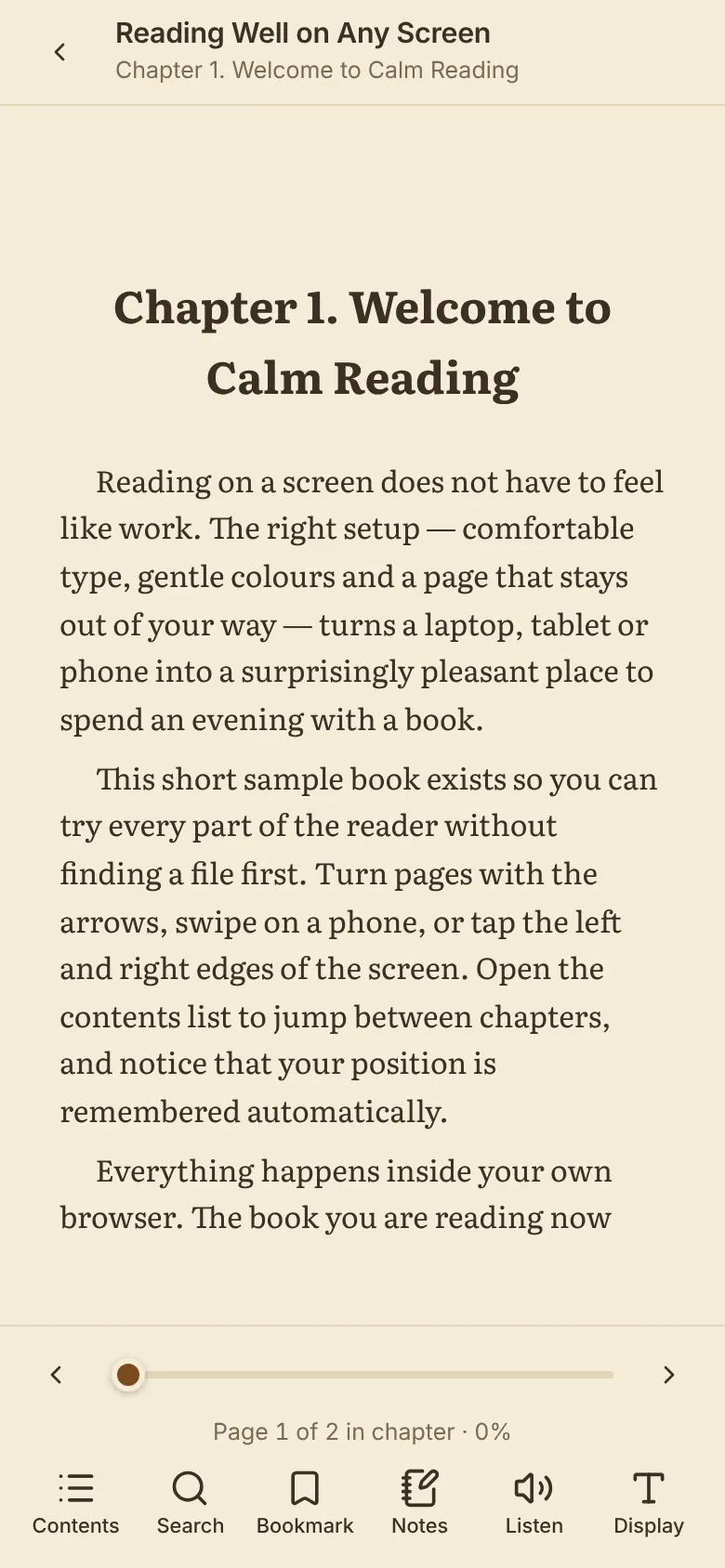
The reader covers the whole window and can enter true full-screen mode where the browser allows it. On touchscreens, tap the middle of the page to hide the toolbars.
Arrow buttons, keyboard keys, swipes and tap zones at the page edges. Choose paged reading or continuous scrolling.
Jump through the table of contents from EPUB navigation files, PDF outlines and document headings.
A position slider, page numbers or percentages, and the current chapter name in the toolbar.
Find words and phrases with excerpts and step through every match.
Save the current place instantly; the icon fills in when the page is bookmarked.
Themes, fonts, spacing, margins, width, layout and zoom — only the options that apply to the open format.
Close the reader with the back arrow, the Escape key or your phone’s back gesture. Your place is saved first.
Make it yours
Reflowable books let you change almost everything about how text looks. Fixed-layout documents get the controls that genuinely apply to them.
Chapter Three
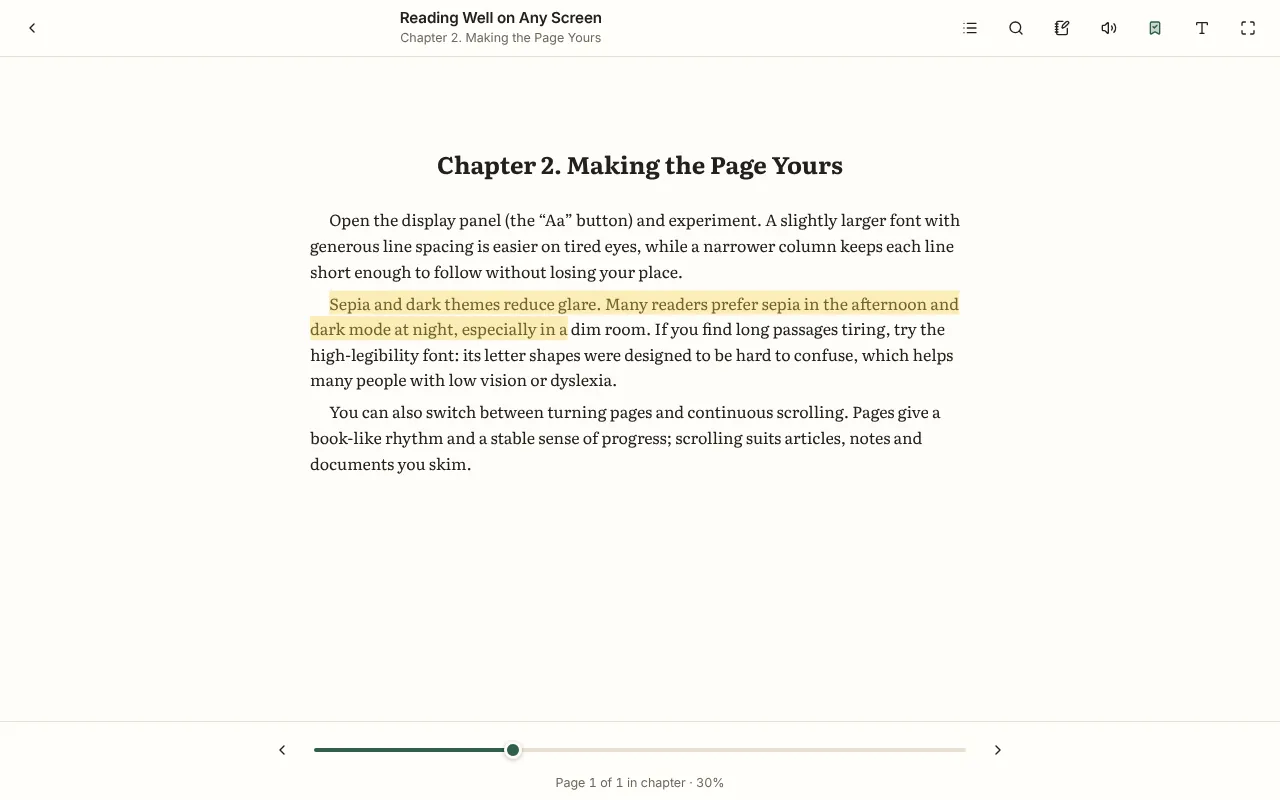
The lamp threw a small circle of light across the table, and for the first time that week the house was quiet enough to hear the pages turn. She had meant to read only a chapter. An hour later the tea had gone cold, and the story had carried her somewhere entirely different.
Good typography is invisible: it lets the words do their work. Try the controls above to see how size, font and colour change the feel of a page.
| Setting | What it does | Applies to |
|---|---|---|
| Font family | Literata, Georgia, Atkinson Hyperlegible, Inter, system sans-serif, monospace — plus the book’s own font for EPUB. | Reflowable formats |
| Text size | 70% to 220%, in steps you can feel. | Reflowable formats |
| Line & letter spacing | Open up dense text for easier tracking. | Reflowable formats |
| Margins & reading width | Keep lines at a comfortable length on wide screens. | Reflowable formats |
| Light, sepia & dark | For the whole reader; PDFs can optionally be tinted to match. | All formats |
| Pages or scrolling | Remembered separately for books, PDFs and comics. | All formats |
| Zoom & fit | Fit width, fit page, or exact zoom. | PDF and CBZ |
Ordinary PDFs have a fixed page layout, so their text cannot be reflowed into a different font or size. The reader hides those controls for PDFs and offers zoom instead.
My library
Every book you open lands on your shelf with its cover and progress. Organise books by what you are doing with them. Only this browser can see your shelf.
Your shelf is empty. Books you open appear here with their progress. Only this browser can see them.
Pick up where you left off
Your place is saved as you read, using positions that suit each format: precise EPUB locations, PDF page numbers and paragraph positions for documents.
Nothing in progress yet. Open a book and your place will be remembered automatically on this device.
Positions are saved as EPUB CFIs — exact character locations — so you return to the same sentence even after changing the font size. Percentages are calculated once the book has been indexed.
Positions are page numbers, which never change. Progress is your page divided by the page count.
DOCX, TXT, Markdown, FB2, ODT and HTML positions are stored as paragraph numbers, which stay stable across layout changes.
When you reach the end of a book it moves to your Finished shelf automatically. You can always move it back.
Bookmarks
Save any place with one tap, give it a name, and jump back to it later — from inside the reader or right here.
Bookmarks are private: they are stored in this browser and never sent anywhere.
No bookmarks yet. In the reader, tap the bookmark icon to save your current spot with an optional label.
Select text in an EPUB, DOCX, TXT, Markdown, FB2, ODT or HTML book to highlight it or attach a note. Saved passages will be listed here.
Highlights & notes
Select text to highlight it in four colours or attach a note. Highlights stay anchored to the exact words, even when you change the font size.
Text highlights work in EPUB, DOCX, TXT, Markdown, FB2, ODT and HTML. PDFs support page notes but not text highlights in this version, and comics are images, so they support page notes only.
Reading tools
Find every occurrence of a word or phrase, step through the matches and jump straight to them. Search runs on your device — your text is never sent to a search service.
Search is case-insensitive and finds phrases exactly as typed. Results show the surrounding text and the chapter or page.
Jump to any result, or use the previous and next buttons. The match is highlighted on the page.
The text is searched in your browser. Nothing is sent to a search service, and searching works offline once the reader is loaded.
Scanned PDFs are photographs of pages. Unless the file includes a hidden text layer (added by OCR software), there are no words to find — the reader will tell you when this is the case. Comic archives contain only images and are not searchable. Very large books are searched chapter by chapter with a progress indicator.
Listen
Read-aloud uses the speech voices built into your browser and device, highlighting each paragraph as it is spoken. Try your voices below.
Focus
Set a session goal, start the timer and read. Time spent in the reader is also counted automatically while the book is open and the tab is visible.
Timer sessions and reader time are stored locally and combined into your daily total. Nothing is uploaded.
Your reading
A private overview of your reading habits, built only from what is actually measured on this device.
What is measured: books opened on this device, books on your Finished shelf, reading sessions longer than 20 seconds, and minutes while a book is open in a visible tab with recent activity (or while the timer runs). A streak counts consecutive days with at least one minute of reading. We do not estimate words or pages read.
Learn
What each format is good at, where it struggles, and which one to choose for different kinds of reading.
A fixed-layout format that looks the same everywhere — ideal for forms, papers and print-faithful documents.
Read the guideThe open standard for reflowable eBooks, used by most publishers and libraries.
Read the guideThe everyday word-processing format — PageFlow converts it into clean, comfortable reading text.
Read the guideThe simplest and most durable format — just characters, with no formatting.
Read the guidePlain text with lightweight formatting — readable as-is and attractive when rendered.
Read the guideAn XML eBook format popular in Eastern Europe, with rich metadata and embedded images.
Read the guideThe open-standard word-processing format used by LibreOffice and others.
Read the guideSaved web pages and exported documents, displayed safely without scripts.
Read the guideA ZIP archive of page images — the common format for digital comics and manga.
Read the guideAn older eBook format associated with early Kindle devices.
Read the guideAmazon's Kindle format, usually protected by DRM when purchased.
Read the guideGuides
Short, practical articles to help you read more comfortably and keep your digital library in order.
Open an EPUB straight in your browser, keep your place automatically and adjust the text until it is comfortable — no app or account needed.
A practical guide to opening PDFs online, choosing the right zoom, searching the text and understanding the limits of fixed-layout documents.
Fixed layout or reflowable text? We compare PDF and EPUB for phones, tablets, study, accessibility and long-form reading.
Small changes to text size, spacing, themes and page turning make a big difference to comfort on a small screen.
Simple habits for naming files, using shelves, keeping backups and finding books again quickly.
What each tool saves, how positions survive font changes, and how to export your annotations.
What is inside an EPUB, a DOCX or a CBZ? Why do some files reflow and others do not? A clear introduction to common reading formats.
How font choice, size, spacing, contrast and read-aloud can make digital reading easier for people with low vision, dyslexia or visual fatigue.
Privacy first
Here is exactly what happens to your files and reading data — and the tools to inspect or delete everything stored in this browser.
When you open a file, your browser reads it from your device and the reader renders it on your device. The file is not uploaded to this website or to any other server.
Titles, covers, progress, bookmarks, notes, statistics and settings are kept in this browser’s IndexedDB. A copy of a book file is stored only if you choose “Keep a copy in this browser”.
Every document is treated as untrusted. Converted HTML is sanitised with DOMPurify, EPUBs render in a sandboxed frame where scripts cannot run, and remote images or trackers inside documents are blocked.
Document contents, titles and file names are never placed in page addresses or page titles, or passed to advertising or analytics services, and no ads load inside the reader. Any advertising or analytics on the informational pages runs in your browser like on other websites:
This website does not use an analytics service at the moment. If one is added, this section will name it and describe the information it collects.
Checking browser storage…
Exports contain titles, progress, bookmarks, notes and statistics — never the book files themselves.
How it works
Five steps from file to comfortable reading. These are real screenshots of the reader.
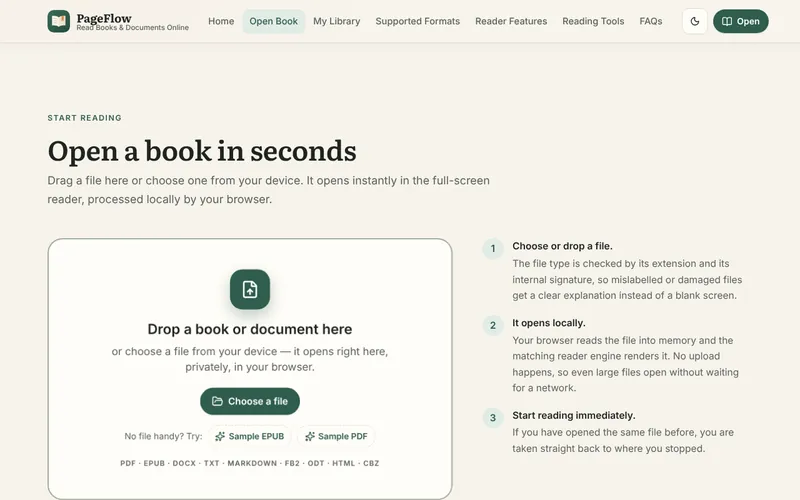
Press Open Your Book or drag a PDF, EPUB, DOCX, TXT, Markdown or other supported file onto the drop zone.
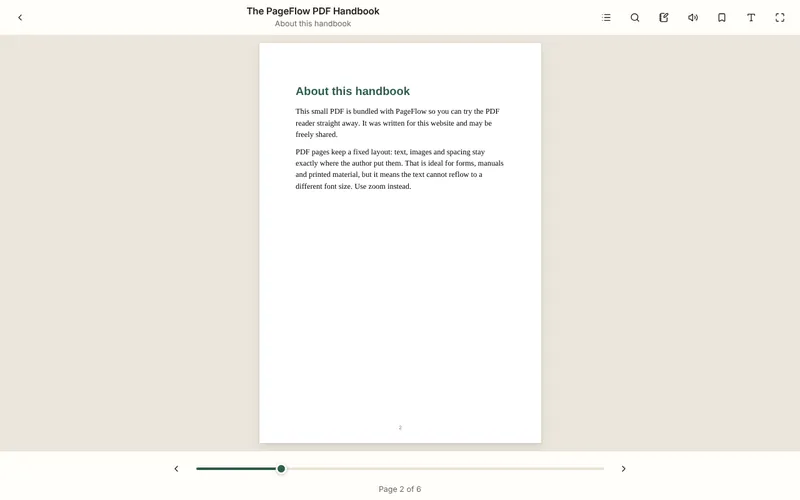
The file is processed on your device and shown in the full-screen reader within seconds. No upload, no waiting.
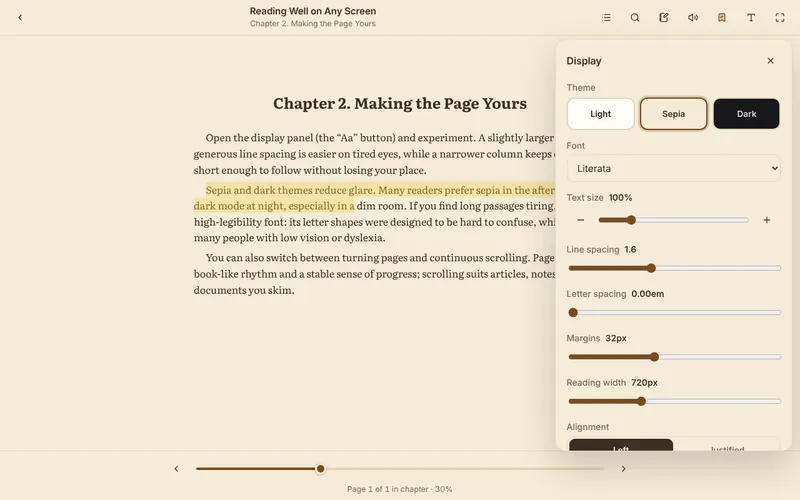
Pick a theme, font, size and spacing — or zoom for PDFs. Settings are remembered.
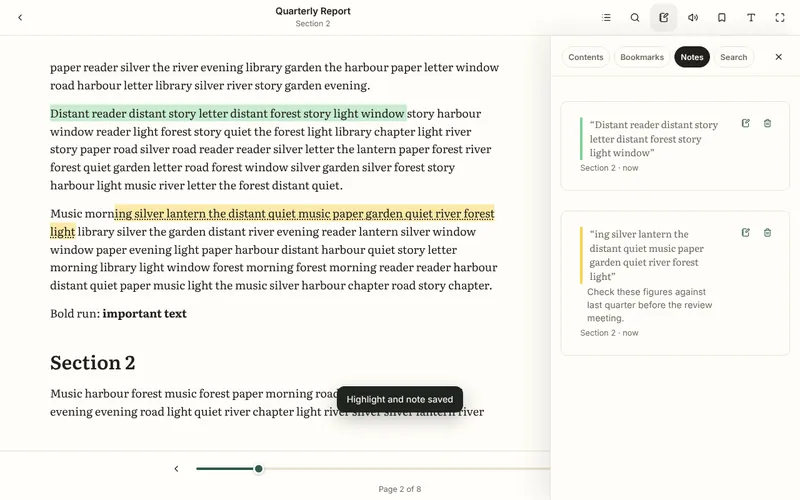
Bookmark pages, highlight passages and write notes. Everything is listed in the notes panel.
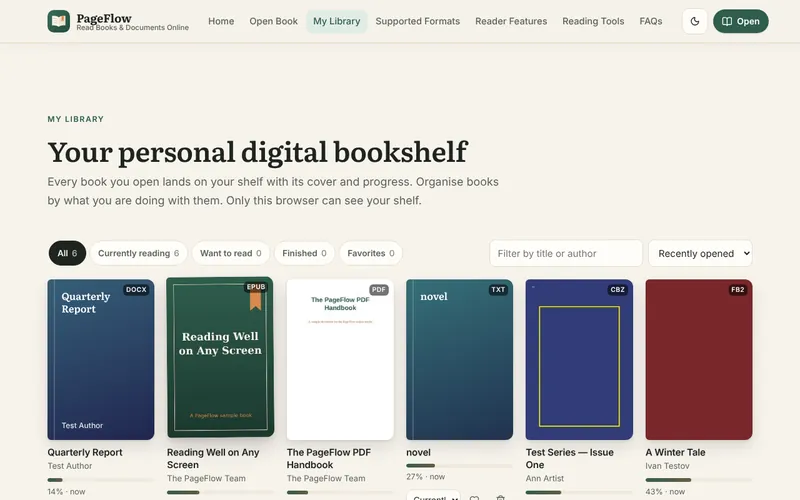
Your shelf shows progress and a Resume button. Saved books reopen instantly; others reopen when you choose the file again.
FAQ
Straight answers about formats, privacy, offline use and what the reader can and cannot do.
Yes. Open any PDF with the Open Your Book button or drag it onto the drop zone. Pages are rendered in your browser with PDF.js, with zoom, scrolling or single-page layout, search, bookmarks and page notes. Password-protected PDFs open after you enter the password.
Yes. DRM-free EPUB 2 and EPUB 3 books open directly in the browser with a full reading interface: chapters, adjustable fonts and spacing, themes, search, highlights, notes and bookmarks. Nothing needs to be installed.
Yes. Word documents are converted on your device into clean, reflowable reading text with headings, lists, tables and images. Complex layout (text boxes, columns, tracked changes) is simplified, and older .doc files are not supported. The reader is for reading, not editing.
No. Your files are opened and processed entirely inside your browser. They are not sent to this website or to any other server. If you choose “Keep a copy in this browser”, the file is stored in your own browser’s storage on your device, and you can delete it at any time.
Yes. Your position is saved automatically on this device and restored when you open the same file again, even if it has been renamed. Your bookshelf shows each book’s progress with a Resume button. To reopen a book without choosing the file again, enable “Keep a copy in this browser”.
Partly. After you have visited the site once over HTTPS, the reader application can load without a connection if your browser supports offline web apps. Books are available offline only if you saved a copy in this browser. Files that were not saved must be chosen again from your device.
Yes. On phones the reader switches to an app-like layout with a bottom toolbar, large touch targets, swipe and tap page turning, and a distraction-free mode (tap the middle of the page). It works in current versions of Chrome, Safari, Firefox, Samsung Internet and Edge.
Many eBooks bought from online stores are protected with DRM (digital rights management) so they can only be read in the store’s own apps or devices. PageFlow does not remove or bypass DRM. DRM-free books open normally; for protected books, use the app provided by the store.
Yes, for reflowable formats: EPUB, DOCX, TXT, Markdown, FB2, ODT and HTML. You can also change the font, line spacing, letter spacing, margins, width, alignment and theme. PDFs and comics have a fixed layout, so you use zoom instead.
Yes. Press the bookmark button (or B on a keyboard) to bookmark your current place, and press it again to remove it. Bookmarks can be renamed, are listed in the reader and on the homepage, and are stored privately in your browser.
PDF, EPUB, DOCX, TXT, Markdown, FB2, ODT (basic), HTML (basic) and CBZ comics. MOBI, AZW3, DjVu, RTF and CBR are not supported in this version. The compatibility table on this page shows which features work with each format.
PageFlow never sends your documents, their titles or their text to advertising or analytics services, never puts them in page addresses or page titles, and shows no ads inside the reader. Advertising and analytics scripts that the site owner enables run in your browser like on any website and may collect standard browsing information as described in the Privacy Policy.
Go to the Privacy and Document Security section. You can inspect every stored book, remove stored files, delete individual books with their notes, or delete all PageFlow data from this browser in one step. Clearing your browser’s site data also removes everything.
Your library is stored only in the browser where you created it, which keeps it private. To move it, use Export reading data on one device and Import on the other. Book files are not included in exports; open them again on the new device.
This format has a fixed layout, so font, spacing and reflow settings do not apply. Use zoom instead.